

Run-length encoding (RLE) is a compression method that replaces runs of the same repeated value with a single value plus a count. Instead of storing "AAAAA" as five separate characters, it stores "5A", shrinking the data whenever the same symbol repeats many times in a row. That one simple idea is why RLE still shows up in fax machines, bitmap files, and even inside more advanced compression formats today.
Content Table
How run-length encoding works
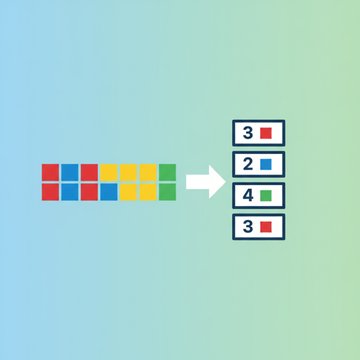
The whole algorithm boils down to scanning your data from start to finish and grouping identical, consecutive values. Each group of repeated values (called a "run") gets replaced by two pieces of information:
- The value that repeats (a character, a byte, a pixel color).
- The count of how many times it repeats in a row.
That is it. There is no dictionary, no probability model, no math beyond counting. This is why RLE is often the first example taught when people learn about a simple compression algorithm. It is also lossless, meaning you can rebuild the exact original data from the compressed version with zero loss.
A worked example step by step
Say you want to compress this string of 28 characters:
WWWWWWWWWWWWBWWWWWWWWWWWWBBBReading left to right and counting each run gives you:
- 12 of "W"
- 1 of "B"
- 12 of "W"
- 3 of "B"
The RLE output becomes:
12W1B12W3BThe original was 28 characters. The encoded version is 10. That is roughly a 64% size reduction, and you can reverse it perfectly by expanding each count-value pair back out. This exact black-and-white pattern is the classic textbook demo because it mirrors how bitmap compression treats long stretches of the same pixel.
When RLE shines and when it fails
RLE is not a general-purpose compressor. Its performance depends entirely on how "runny" your data is.
| Data type | RLE result | Why |
|---|---|---|
| Black-and-white scanned document | Excellent | Long runs of white space between lines of text. |
| Simple logos and line art | Very good | Large flat areas of a single color. |
| Photographs | Poor | Colors change pixel by pixel, so runs are tiny. |
| Random or already-compressed data | Worse than nothing | No repeats to exploit; overhead adds size. |
Already-compressed data is the worst case: it is the same reason a ZIP of JPGs barely shrinks.
The failure case matters. If you feed RLE the text "ABCDEF" with no repeats, a naive encoder produces "1A1B1C1D1E1F", doubling the size. Good implementations guard against this, but the lesson stands: match the tool to the data.
Where RLE is actually used
Despite its age, run-length encoding is still baked into formats and hardware you use regularly:
- Fax machines. The ITU-T Group 3 fax standard uses RLE-based coding to compress the long white gaps in scanned pages, making fax compression one of RLE's oldest real-world jobs.
- Bitmap and image formats. The BMP file format supports an RLE mode (BI_RLE8 and BI_RLE4), and older formats like PCX and early TGA relied on it heavily.
- TIFF files. TIFF supports PackBits, an RLE variant, and CCITT fax compression for black-and-white scans.
- Inside bigger algorithms. JPEG uses RLE on runs of zero coefficients after the discrete cosine transform, and the Burrows-Wheeler stage in tools like bzip2 pairs beautifully with RLE compression.
- PDF and PostScript. Both support a RunLengthDecode filter for embedded image data.
Common RLE variants and pitfalls
There is no single "official" RLE format, which trips up a lot of beginners. Different systems make different choices:
- Count-then-value vs value-then-count. Some encoders write "12W", others write "W12". Both work; you just have to decode with the same convention.
- Escape-based RLE. Instead of counting every run, some formats only encode runs longer than a threshold and pass literal bytes through, avoiding the "1A1B1C" size blowup.
- Byte limits. If your count is stored in a single byte, the maximum run length is 255. Longer runs must be split into multiple pairs.
- The delimiter problem. If your data can contain digits, "12W" is ambiguous. Binary RLE formats avoid this by using fixed-size fields instead of text.
A simple RLE implementation
Here is a compact Python encoder and decoder so you can see the entire idea in a few lines:
def rle_encode(data):
    if not data:
        return ""
    result = []
    count = 1
    for i in range(1, len(data)):
        if data[i] == data[i - 1]:
            count += 1
        else:
            result.append(f"{count}{data[i - 1]}")
            count = 1
    result.append(f"{count}{data[-1]}")
    return "".join(result)

def rle_decode(data):
    import re
    return "".join(ch * int(n) for n, ch in re.findall(r"(\d+)(\D)", data))

print(rle_encode("WWWWWWWWWWWWBWWWWWWWWWWWWBBB"))
# 12W1B12W3B
The encoder walks the string once and counts consecutive matches, so it runs in linear time. The decoder just multiplies each character by its count. For real binary data you would swap the text format for fixed-size byte pairs, but the logic stays identical.

Shrink and convert your files without the guesswork
Logos, line art and screenshots have the flat areas RLE loves. Compress them losslessly as PNG.
Compress PNG →
Run-length encoding is completely lossless. It only replaces repeated runs with a count and a value, so decoding rebuilds the original data exactly, byte for byte. Nothing is approximated or discarded, which is why it is safe for text, bitmaps, and archival image formats.
Yes. If your data has few or no repeated runs, a naive RLE encoder stores a count for every single value, which can double the size. Real formats avoid this with escape codes or thresholds that pass literal, non-repeating data through untouched.
Scanned documents are mostly white space with thin black text, creating very long runs of identical pixels. RLE-based coding in the Group 3 fax standard compresses those white gaps dramatically, cutting transmission time while keeping the algorithm simple enough for cheap hardware.
ZIP and gzip use dictionary-based methods (LZ77) plus Huffman coding to spot repeated patterns anywhere in the data. RLE only catches immediately consecutive repeats. That makes RLE far simpler and faster but much weaker on general files, so modern formats often combine it with smarter stages.
Not by itself. Photos have colors that shift pixel by pixel, so runs are tiny and RLE saves almost nothing. Photographic formats like JPEG only use RLE on the runs of zeros produced after a frequency transform, not on the raw pixel data directly.